Client Support
Our Support Platform - Basecamp
Watch the 60 Sec - HOW TO USE Basecamp Video
BASECAMP REPLY EMAILS
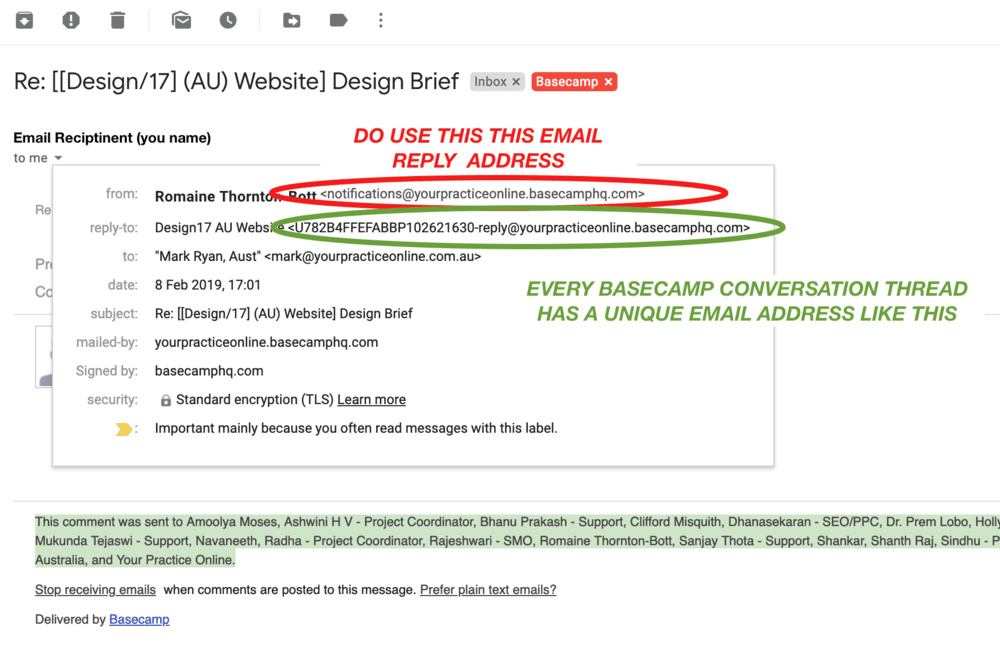
IMPORTANT - Do not copy and paste or use these emails:
notifications@quantumdigital.basecamphq.com
notifications@yourpracticeonline.basecamphq.com
Instead select Reply and it will be sent to the actual Basecamp "threat email"

FORGOTTEN BASECAMP PASSWORD?
Click to reset your Basecamp password below
Questions Relating to Logins or Access
There are two types of online access
WEBSITE EDITING ACCESS
For Website Editing access or Content Management System (CMS) access, the link is
test.quantumdigital.com.au/login
You previously received an email with details on how to log in and set your access password.
CMS TRAINING
To access How to use the CMS Website Editor, training videos are here
www.quantumdigital.com.au/cms-support
SUPPORT PORTAL ACCESS
We use a Client Support System called Basecamp, and access to and how to use this is covered on the page
www.quantumdigital.com.au/contact-support
The direct Basecamp login page, the link is
launchpad.37signals.com/basecamp/930186/signin
Hint: We recommend saving your Basecamp and Website logins and passwords to your browser to ensure easy access
Your Support Team
Let your team meet our team. The PMS Basecamp is the easiest way to communicate with all your website support team. It keeps all your website information in one spot.
Coordinated Website Development And Support
Anyone in your practice who has inputs or needs to keep abreast of the development and then ongoing maintenance and marketing should be include. If there is a change simply advise us.
Your Entire Website History In On Place
Overtime your Basecamp will become your website’s history and backup resource for all changes that have occurred to your website.
When Requesting Edits
In order for us to help you please consider the following when making change request, please provide.
- Identify the page (name or URL) you wish to edit),
- Where on the page is the change required
- Full details on what exactly needs to be changed, removed or added,
Basecamp can support individual files up to 2Gb files